
Final preparations
Updated 11 Mar 22: added entry photo requirements
Updated 10 Mar 22: clarify that you must print before starting FLOWlock Browser
Updated 10 Mar 22: clarify that you must print before starting FLOWlock Browser
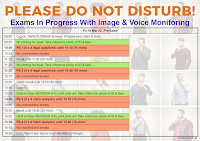
- This is a detailed exam schedule for Pre-Exam (PE) 2022, indicating scheduled and unscheduled break times.
- Don’t forget your calendars
- External Resources at www.epo.org are available online during the exam. For all other materials, such as PCT Applicants Guide, you will need to have them on paper.
- Be prepared to contact the invigilators by chat widget, and be prepared to deal with FLOWlock Browser crashes. Only in emergencies and if the chat widget is not available, call the epo helpdesk: +49 89 2399 5155. Telephone lines are very limited – the chat widget is strongly recommended. Communication via email will not be dealt with.
- Last year, candidates received an e-mail with a hyperlink just before the exam. This year, no email will be sent – the flows will made available well before each of your exams, so you will see them after logging into WISEflow.
- Get everything ready early so you can relax. It is recommended to log-in 60 minutes before the start of the first flow. This will also give enough time to make sure that the room requirements are complied with, and to create your own evidence.
- Print BEFORE starting the FLOWlock Browser: 10 minutes before the start of the exam, any printable documents will appear on the flow page. Click on the refresh icon (clockwise arrow) or press F5 to see them.
- It is also possible to print using a second computer logged into WISEflow, but this second computer must be turned off and out of reach during the exam.
During the exam
- Have a valid official photo ID (identity card or passport) ready and keep it within easy reach during the whole exam. You MUST verify your identity at the start of EACH FLOW by holding your ID next to your face for the entry photo. See Instructions to Candidates ITC IV, 6.
- During the exam, you must to stay in front of the camera – everything you want to use must be within arms reach.
- Don’t lose track of time ⏰ during the scheduled lunch break – if you are more than 10 minutes late, you may need the invigilator password to start the flow
- During scheduled exam times and scheduled breaks, don’t go online discussing the exam or share confidential exam info, such as personal login details & invigilator passwords. Wait until the scheduled end of the last part of each exam – after that, you can freely discuss. But remember – no-one knows the expected answers and which alternatives will be accepted.
Make sure you answer ALL the questions
- If you are not sure of an answer, or you know it will take a long time to figure it out or to look it up, leave the question(s) until the end. But make sure you give an answer to each question before the end of the part.
Good luck!

Leave a Reply